
Knowledge base > Add new property
How to Add a New Property on Zleeper
Setting up your property on Zleeper is simple and beginner-friendly.
Follow the steps below to create your property profile correctly so your bookings, invoices, and calendar work smoothly.
This guide is designed for hotel owners, homestays, hostels, and vacation rentals — even if you have zero hotel management experience.
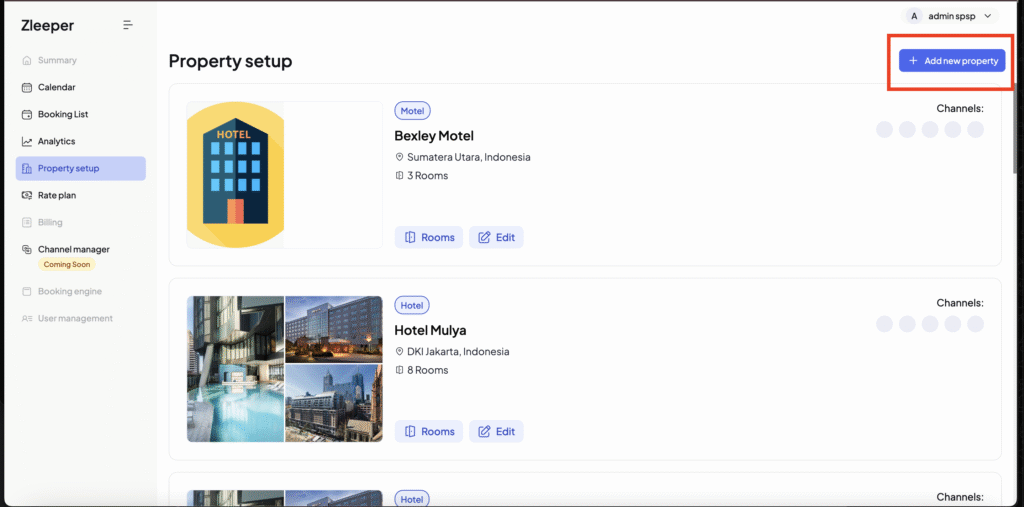
Step 1: Click “Add New Property”
On the Property Setup Menu, click the “Add New Property” button.
You will be directed to the Property Sign-Up Form where you can enter your property details.
Step 2: Fill in Your Property Information
Please complete the form carefully based on your real property details.
Property Name
Enter the name of your property exactly as it appears on:
- Google Maps
- Booking.com
- Agoda
- Airbnb
- Or your official website
This helps guests recognise your property easily.
Example:
“Rara Home Stay Da Nang”
“Sunrise Hotel Bali”
Property Type
Select the type that best describes your accommodation:
Hotel
A professionally managed accommodation with many rooms and full services such as reception, housekeeping, restaurants, and facilities. Ideal for business and leisure travelers.
Motel
A simpler, budget-friendly roadside lodging. Rooms are usually accessible from the parking area and services are more limited. Best for short overnight stays.
Vacation Rental (Airbnb / Homestay / Apartment)
A privately owned house, apartment, or villa rented short-term. Usually includes self check-in, kitchen, and living space with fewer traditional hotel services. Offers a more home-like experience.
Choose the one that fits your property best — there is no wrong choice.
Property Star Rate
Star rating is usually for hotels only.
If your property has an official star rating, you can select it.
If not, simply choose the option that you think best represents your property quality.
This will not affect your system performance.
Address
Enter your full property address (Street, City, Country).
If your city or country is not available in the dropdown list, please email: [email protected]. Our team will add it for you.
Email & Phone Number
Add the most contactable email and phone number of your property.
Important:
This contact information will be used on:
- Guest invoices (PDF)
- Booking confirmations
- System notifications
Make sure it is active and correct.
Location (Google Maps Link)
This helps guests and staff locate your property accurately.
How to get your Google Maps link:
- Open Google Maps: https://www.google.com/maps
- Search your property name or address that closest to your property
- Click your property location
- Copy the full URL link
- Paste it into the field, and
- Click button “Set Marker”
You can also watch the video below to understand better how to add your property location.
Famous Places (Nearby Attractions)
You can add nearby famous places your guests may want to visit.
Examples:
- Beach
- City Center
- Night Market
- Airport
- Tourist Attractions
Tip: Keep it short and simple.
Example:
“5 mins to City Center”
“10 mins to Beach”
Property Facilities (Property Place)
This section is for facilities available in your property (NOT inside the room).
Examples:
- Reception
- Swimming Pool
- Restaurant
- Parking
- Elevator
- Lobby
- Garden
- Gym
Only select facilities that your property actually provides to guests.
Currency & Tax
Select the currency your property mainly uses.
Examples:
- Indonesia → Rupiah (IDR)
- Vietnam → VND
- Australia → AUD
For Tax:
- Select based on whether your property charges tax to guests
- The system will automatically include tax in your PDF invoice for offline payments
- Online payment tax settings can be adjusted later in the system
Languages
Select the languages your staff can communicate in.
This helps guests know what language support is available before booking.
Examples:
- English
- Indonesian
- Vietnamese
- Chinese
Choose all languages your team can serve comfortably.
Property Images
Upload clear images of your property from different angles.
Image Requirements:
- Maximum: 10 photos
- Minimum size: 100 KB
- Maximum size: 5 MB per photo
- Minimum resolution: 630 × 420 px
- Maximum resolution: 4000 × 4000 px
Tips:
- Upload front view of the building
- Lobby
- Exterior
- Facilities
- Surroundings
Good photos increase guest trust and bookings.
Property Policies
Property policies tell guests the rules of staying at your property.
This helps avoid confusion, complaints, and misunderstandings.
Let’s explain each policy in the simplest way.
Check-in Time:
This is the time guests are allowed to arrive and enter their room.
Example:
02:00 PM → Guests can check in starting from 2 PM
If a guest arrives earlier, they may need to wait unless early check-in is allowed.
Check-out Time:
This is the time guests must leave the room.
Example:
12:00 PM → Guests must check out before 12 PM
Late check-out may affect room availability for the next guest.
Early Check-in (Yes / No):
This setting decides if guests can check in before the official check-in time.
Choose:
- YES → If you allow flexible early arrivals (when rooms are ready)
- NO → If you want strict check-in timing
Recommended for small hotels & homestays: YES (if flexible)
Early Check-out (Yes / No):
This means guests can leave earlier than their booking date.
Usually this is set to YES because guests may change travel plans.
Breakfast (Yes / No):
Select YES if your property provides breakfast included in the stay.
Select NO if breakfast is not included.
Extra Breakfast (Yes / No):
Choose YES if guests can purchase additional breakfast (paid option).
Choose NO if you do not offer extra breakfast services.
Pets (Yes / No):
This tells guests whether pets are allowed in your property.
YES → Pet-friendly property
NO → No pets allowed
This is very important for guest expectations.
Minimum Age:
This is the minimum age allowed to check in as a guest.
Common settings:
- 18 years old (standard)
- 21 years old (some hotels)
- No minimum (family-friendly properties)
Recommended:
Set 18 years old for most properties.
Does this page answer your question? If not, please email us at [email protected] and our team will respond promptly to assist you.